
 By Alpit Patel and the aibrevo team · September 16, 2026 · Updated October 31, 2026 · 18 min read
GoHighLevel for Chiropractors: A Practical Automation Guide
How chiropractic practices use GoHighLevel to speed up new patient response, cut no-shows, recover lapsed patients, and automate review requests across single and multi-location practices.
Part of the guide: GoHighLevel by industry
Key takeaways
- New patient inquiries need a response within minutes, not hours, because someone in pain searching for a chiropractor is usually calling or messaging more than one practice and books with whoever answers first.
- Appointment reminder sequences work best as a staged cadence, several days out, the day before, and a few hours before, instead of a single reminder, since each stage catches a different reason a patient might otherwise miss the visit.
- No-show recovery needs to happen the same day a patient misses an appointment, with a clear, low-friction rebooking link, because the longer the gap after a missed visit, the less likely that patient returns at all.
- Treatment-plan follow-up automation matters most for practices running multi-visit care plans, where a patient who skips week three of a twelve-visit plan needs a nudge before they quietly stop coming instead of after.
- Review requests convert best when they're triggered right after a positive interaction, typically shortly after a completed visit, instead of in a generic monthly batch sent to the entire patient list.
- Multi-provider and multi-location chiropractic groups need routing and reporting built by location and by provider, since lumping all patients into one shared pipeline makes it impossible to see which location or provider actually needs support with recall or reminders.
GoHighLevel for chiropractors is a CRM and messaging layer that sits beside your practice-management software: it answers new inquiries, sends reminders, chases no-shows, follows up on care plans and asks for reviews. It starts at $97 a month for the Starter plan, and patient messaging that touches protected health information also needs HighLevel’s $297 a month HIPAA add-on (both checked Oct 22, 2026). Slow responses, missed reminders and quiet no-show attrition are the places a practice loses patients, and GoHighLevel addresses each of them: a workflow that responds to a new inquiry within minutes, a staged reminder sequence that actually reduces missed visits, same-day no-show recovery outreach, treatment-plan follow-up that catches a patient before they drop off a multi-visit care plan, review requests timed to a patient’s best moment, and, for groups running more than one provider or location, routing and reporting that doesn’t collapse everyone into one undifferentiated pipeline. Build the automation around the specific points where chiropractic patients actually fall out of the funnel.
New patient inquiry response
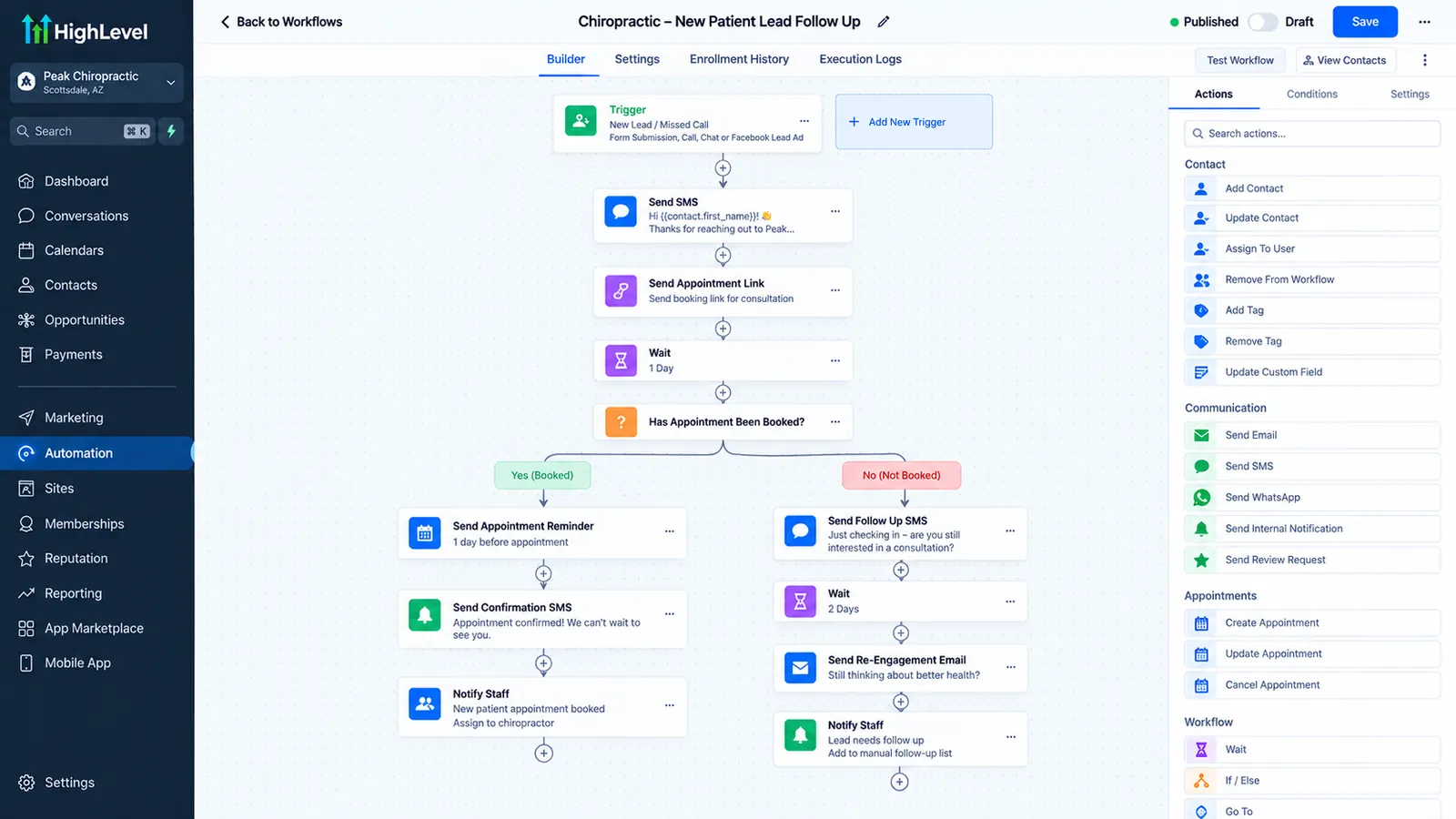
A website form, missed call, or booking-widget inquiry triggers an immediate text confirming receipt and a link to book, plus a task for front desk staff to call back.
Wins the appointment before the next practice calls backStaged appointment reminders
A reminder fires several days out, the day before, and a few hours before each visit, with a direct reschedule link built into every stage of the sequence.
Catches a different reason for missing the visit at each stageNo-show recovery and reactivation
A missed appointment triggers a same-day, non-judgmental message with a direct rebooking link, followed by a spaced-out reactivation sequence for patients who don't respond, and a separate recall flag for patients past their expected visit interval.
Recovers the visit while rebooking still feels like an easy fixTreatment-plan follow-up
Progress tracked through a pipeline stage or custom field flags a patient who skips an expected visit inside an active multi-visit plan, triggering a check-in before the gap widens.
Catches quiet mid-plan attrition instead of noticing it too lateReview request automation
Appointment completion triggers a review request within a few hours, with a direct link to the preferred platform and one spaced-out follow-up for non-responders.
Asks while the patient's relief is still freshMulti-provider and multi-location routing
Dedicated phone numbers per location and reporting filtered by site and provider isolate response time, no-show rate, and recall performance instead of blending it into one aggregate number.
Shows exactly which location or provider needs supportWhat does GoHighLevel cost for a chiropractic practice?
| Item | Price (checked Oct 22, 2026) | What it covers |
|---|---|---|
| GoHighLevel Starter | $97 a month ($970 a year) | 3 sub-accounts |
| GoHighLevel Unlimited | $297 a month ($2,970 a year) | Unlimited sub-accounts |
| GoHighLevel Founder (formerly Agency Pro) | $497 a month ($4,970 a year) | Unlimited sub-accounts, SaaS mode |
| HIPAA add-on | $297 a month, cannot be turned off once bought | Business Associate Agreement; each sub-account still needs its HIPAA toggle |
| aibrevo CRM setup build | $1,499 to $4,999 at the time of writing | Pipelines, automations, calendars, forms and reporting for one business |
Prices come from HighLevel’s pricing page and its HIPAA help article (modified June 11, 2026). Texting adds carrier registration fees; see GoHighLevel pricing explained and the guide to A2P 10DLC registration. For the compliance side in full, read is GoHighLevel HIPAA compliant and the HIPAA setup steps.
New patient inquiry response speed
A person searching for a chiropractor is frequently dealing with acute pain, which means they’re motivated to act quickly and often contacting more than one practice at the same time. The practice that responds first, with a clear next step instead of a vague “we’ll call you back,” tends to win the appointment. A form submission or missed call that sits in an inbox until someone gets to it during a lull between patients is a lost new patient more often than practices realize, because the person has usually already called the next name on their search results.
The fix is the same principle that applies across any inbound-lead business: automate the acknowledgment, then get a human on the phone as fast as the schedule allows. A workflow triggered by a website form, a missed call, or a booking-widget inquiry should send an immediate text confirming receipt and offering a link to select an appointment time, while simultaneously creating a task for front desk staff to follow up with a call. If those callbacks keep going unanswered, check whether your outbound number is being labeled spam likely on patients’ phones. For a practice that gets a meaningful share of after-hours inquiries, this matters even more, since an automated response overnight keeps the lead warm until the office opens.
Appointment reminder sequences that actually reduce misses
A single reminder text the day before an appointment catches some patients and misses others, particularly the ones who booked weeks in advance and simply forgot the visit existed by the time it arrived. A staged reminder sequence covers more of the reasons patients miss appointments: a message several days out helps patients who scheduled far ahead re-confirm the date is still workable, a day-before reminder catches most routine forgetfulness, and a same-day, few-hours-before message catches the patients who need a final nudge or who might otherwise get pulled away by a conflicting commitment.
Each reminder should make rescheduling as easy as confirming, with a direct link instead of a phone number a patient has to call during business hours. A patient who wants to reschedule but faces friction doing so is more likely to simply not show up than to make the call. Building the reschedule link into every stage of the sequence, including the final one, reduces the number of true no-shows versus patients who proactively moved their visit.
No-show recovery and reactivation campaigns
The gap between a missed appointment and outreach matters more than almost any other variable in getting that patient back on the schedule. A same-day message, ideally within an hour or two of the missed slot, has a real chance of reaching a patient while the appointment is still top of mind and rebooking feels like an easy correction. Wait until the next day or later, and the patient has often mentally moved on, especially if the reason they missed the visit was that their pain had temporarily improved.
The recovery message itself should be short, non-judgmental, and built around a direct rebooking link instead of a request to call the office. For patients who don’t respond to the same-day message, a secondary reactivation sequence, spaced out over the following weeks, keeps the door open without becoming repetitive: a check-in a few days later, then a longer-interval nudge if there’s still no response. This same reactivation logic extends to any patient who hasn’t been in for a routine visit in a while. A workflow that flags patients past their expected recall interval, whether that’s a maintenance visit schedule or a general checkup cadence, and sends a re-engagement message is what keeps a patient list from going stale between active treatment plans.
Many of the no-show and retention percentages that get repeated in chiropractic marketing content don’t hold up under a source check. Claims like a flat 40 to 60 percent patient retention rate, patients typically dropping off before their tenth visit, or a fixed 20 to 30 percent no-show rate show up across several CRM and practice-management blogs with no named study or methodology attached. None of the recovery logic above depends on a borrowed percentage. It works because it closes the timing gap between a missed visit and outreach.
Treatment-plan follow-up automation
Multi-visit care plans, common in chiropractic treatment for injuries or ongoing conditions, are especially vulnerable to quiet attrition. A patient starts feeling better after a few visits and skips the remaining sessions in the plan without formally canceling anything, which means nobody at the practice notices until the patient simply stops showing up on the schedule.
Tracking treatment-plan progress on the patient’s contact record, through a pipeline stage or a custom field noting which visit number they’re on and how many remain, lets a workflow catch this pattern early. If a patient misses an expected visit within an active plan, a check-in message can go out asking how they’re doing and offering to help reschedule, instead of waiting for the practice to notice a gap on a spreadsheet weeks later. The workflow is aimed at patients who intended to complete the plan and let scheduling slip. A patient who has finished improving or decided to stop treatment on purpose is a different case.
Review request automation
Timing determines most of the difference between a review request that gets ignored and one that gets completed. A request sent shortly after a positive visit, when the patient’s relief or satisfaction is fresh, converts at a noticeably higher rate than the same request sent as part of a generic monthly email blast to the entire patient list. A workflow triggered by appointment completion, instead of a scheduled batch send, also naturally avoids surfacing a review request to a patient who just had a difficult or negative visit, since it’s tied to that specific appointment instead of firing on a calendar regardless of context.
A practical sequence sends the request within a few hours of a completed visit, with a direct link to the review platform the practice actually wants reviews on, and a brief message that doesn’t read as scripted or transactional. For patients who don’t leave a review after the first request, a single, spaced-out follow-up is usually enough; repeated requests past that point tend to annoy more than they convert.
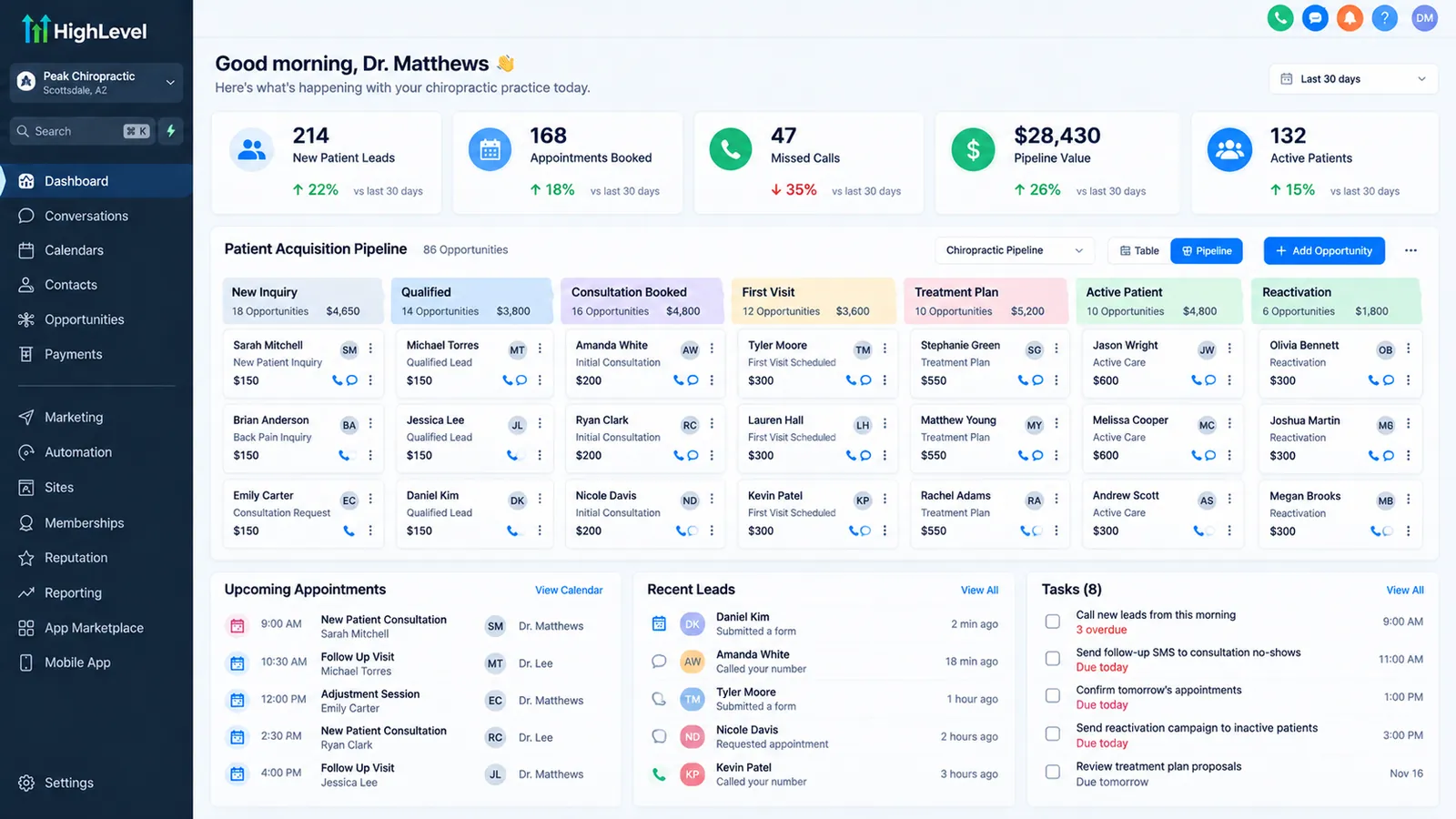 *Illustrative example of a GoHighLevel pipeline view for a chiropractic practice, built with a fictional practice name and invented sample data for demonstration purposes only, not an actual client account.*
Multi-provider and multi-location considerations
More than a third of the chiropractic profession already operates this way. The National Board of Chiropractic Examiners’ Practice Analysis of Chiropractic 2025, a survey of 4,041 practicing chiropractors that NBCE runs roughly every five years, found that 49% of chiropractors work solo, 36% work in multi-doctor offices, and 12% practice in multidisciplinary or integrated facilities. Multi-provider automation is the operating reality for well over a third of practicing chiropractors.
A chiropractic group running more than one provider or more than one location faces a structural question similar to any multi-location service business: which parts of the automation get shared, and which need to stay separate. Reminder sequences, review-request templates, and no-show recovery logic can generally be built once and deployed across every location, since the underlying patient behavior and messaging don’t need to differ much location to location.
What does need separation is anything tied to a specific location’s operations or a specific provider’s schedule: phone numbers used for texting and calling, appointment scheduling windows if locations run different hours, and reporting on response time, no-show rate, and recall outreach broken out by location and provider. Without that breakout, a group has no way to see that one location is responding to new patient inquiries in ten minutes while another is taking most of a day, or that one provider’s patients are missing follow-up visits at a noticeably higher rate than another’s. That visibility lets a practice manager act on a specific, fixable problem.
A dedicated phone number per location also matters for a reason that has nothing to do with reporting: a shared number across sites makes it impossible to route an inbound call or text to the right front desk without a manual transfer, and it muddies A2P texting compliance since carriers expect a consistent sender identity tied to a specific business location. Each texting number also has to sit under a registered A2P 10DLC brand and campaign; HighLevel lists a one-time brand fee from $22.50 and a monthly campaign fee of $1.50 to $10 by use case, which the A2P 10DLC fee calculator totals for you. Provisioning a distinct number per site during setup avoids having to retrofit that separation later, once patients are already used to texting a shared line.
Multi-doctor groups are usually already running a clinical practice-management platform, so the overlap needs addressing. ChiroTouch sells tiers that bundle reputation management and automated recall messaging (check its pricing page for the current bundle, since tiers change), and ChiroHD and Genesis Chiropractic Software cover similar communication basics on top of their scheduling and billing cores. GoHighLevel isn’t positioned to replace any of those systems. It works better as a communication and automation layer built around whatever clinical or EHR platform a practice already runs, with more flexibility in workflow design than a fixed automation bundle typically allows. A group already paying for a ChiroTouch tier that includes recall automation should compare what that bundle actually lets them configure against what a purpose-built workflow can do before assuming the built-in feature covers the same ground.
HIPAA and compliance considerations for patient messaging
Chiropractic communication frequently touches protected health information, even something as routine as an appointment reminder that references a treatment plan or visit type, which means compliance has to be settled during setup. GoHighLevel’s base subscription tiers are not HIPAA-compliant by default. HighLevel sells a HIPAA package at $297 per month, billed to the agency account and permanent once enabled, which includes a Business Associate Agreement. After the BAA is signed, each sub-account that stores patient data still needs its HIPAA toggle switched on in Advanced Settings. A practice handling PHI over SMS or email needs all of that in place. The full setup sequence, including the per-sub-account HIPAA toggle, is in our answer to is GoHighLevel HIPAA compliant; clinics beyond chiropractic, such as TRT, weight-loss and primary care, are covered in GoHighLevel for medical clinics.
Two practical points apply once the add-on is enabled. First, confirm which specific communication channels and fields fall under the BAA’s coverage. A HIPAA-enabled account doesn’t automatically make every workflow, integration, and third-party connector in the account compliant by extension, since a connected app or a misconfigured field can still create exposure outside the covered scope. Second, keep appointment reminders and recovery messages generic enough to avoid stating a diagnosis or treatment detail in the message body itself. “Your appointment is tomorrow at 2pm, reply to confirm” doesn’t carry the same compliance weight as a message referencing a specific condition. Practices unsure whether their current messaging templates cross that line should have someone review actual message copy against HIPAA’s minimum-necessary standard before scaling a workflow across the full patient list, not after a template’s already gone out to hundreds of patients.
Pre-visit intake and paperwork automation
A new patient’s first visit runs more smoothly, and takes less front-desk time, when intake paperwork is completed before they walk in instead of filled out on a clipboard in the waiting room. A workflow triggered as soon as a new patient books an appointment can send a link to digital intake forms, insurance information capture, and a brief pre-visit questionnaire about the patient’s condition, with a reminder to complete it if it’s still outstanding a day before the visit. This shifts paperwork time out of the appointment slot and gives the provider a few minutes to review the patient’s stated condition before the visit starts.
The same automation should flag a patient who hasn’t completed intake by the day before their visit. A staff task created automatically when intake is still outstanding close to the appointment time gives front desk staff a specific, actionable list to work through instead of discovering the gap only when the patient arrives without having filled anything out, which is what actually causes the day-of delays a practice is trying to avoid by digitizing intake in the first place.
Referral source tracking and win-back
Chiropractic practices, more than many healthcare businesses, depend on an ongoing referral relationship with other providers, physical therapists, orthopedists, primary care physicians, who send new patients on a recurring basis instead of as a one-time event. That relationship is easy to lose track of manually: a referring provider who sent three patients last quarter and zero this quarter is a signal worth noticing, but without a system tracking referral source on each new patient’s contact record, that kind of drop-off is invisible until someone happens to remember the previous volume.
Tagging each new patient with their referral source, whether that’s a specific provider, a patient referral, or a marketing channel, turns referral tracking into a reportable number instead of a general impression. A workflow can then flag a referring provider whose volume has dropped compared to a prior period and prompt a relationship check-in, a call, a visit, a thank-you note for a specific case, so a previously reliable referral source doesn’t go cold unnoticed. This differs from the patient-level reactivation covered above but uses the same mechanism. Automation doesn’t replace the relationship-building work; it flags when that work is due.
Measuring whether the automation is actually working
Automation is only worth the setup effort if a practice can point to a real before-and-after difference, and that requires recording a baseline before changing anything. Three numbers map directly to the workflows covered above and are worth tracking specifically: average response time to a new patient inquiry (from form submission or missed call to first outbound contact), no-show rate before the staged reminder sequence goes live versus after, and review volume per month before and after review-request automation is turned on.
None of these needs sophisticated reporting. A practice can pull response-time data from call logs or the CRM’s own activity timeline, track no-shows manually for a few weeks before and after the reminder sequence launches, and count reviews received per month from whichever platform the practice collects them on. What matters is having a before number to compare the after number against.
Rebuild or fix: reading the signals
Some chiropractic CRM problems are quick corrections. A reminder sequence sending only one message instead of the intended staged cadence usually means a workflow step got disabled or misconfigured, so the fix is that one step. A review request going out to a patient who had a bad visit is often a trigger condition that needs a small adjustment.
A structural gap looks different: no automated response to new inquiries at all, no tracking of treatment-plan progress so patients drop off unnoticed, or a multi-location group with no way to see performance broken out by site. Those need real setup work because they’re missing pieces of the system, and they’re worth prioritizing before adding more patient volume on top of a system that isn’t following up on the patients already coming through the door.
The bottom line for chiropractic practices using GoHighLevel
The chiropractic practices getting the most out of GoHighLevel cover the specific moments where patients actually fall through: the first few minutes after a new inquiry, the days leading up to an appointment, the hours right after a missed visit, the middle of a multi-visit treatment plan, and the moment right after a good visit when a review is easiest to ask for. Multi-location groups add one more layer on top: keeping that same coverage visible and manageable by location and provider. For a practice or group ready to scope this out, the GoHighLevel implementation services page walks through what a properly structured project includes, and the GoHighLevel agency setup guide is worth reading alongside it if you’re managing more than one practice location.
A comparable appointment-driven build is Smile Bright, a dental practice that moved every enquiry into one CRM with instant replies and reminders, and reports first response falling from 45-90 minutes to under 5 (client-reported).
When to get help
A single clinic can build the reminder and review flows from this page alone. Help pays off when you have several locations, need the HIPAA setup done correctly the first time, or an existing workflow is missing texts. Book a short call or send a message, and see our GoHighLevel implementation service. A similar build for another appointment business is covered in GoHighLevel for dental practices, and booking setup is in the calendar booking guide.
Sources
- National Board of Chiropractic Examiners, Practice Analysis of Chiropractic 2025 (4,041 respondents; practice-structure shares). Published 2025; figures as reported by NBCE.
- HighLevel Help Center, HIPAA Compliance With HighLevel, modified June 11, 2026. Checked October 7, 2026.
- HighLevel, pricing page. Checked October 7, 2026.
- HighLevel Help Center, A2P 10DLC fees, modified September 24, 2026. Checked October 7, 2026.
- ChiroTouch, pricing page (tier contents change; confirm current bundle).