
 By Alpit Patel and the aibrevo team · September 16, 2026 · Updated October 13, 2026 · 16 min read
GoHighLevel for HVAC Companies: A Practical Automation Guide
How HVAC and home-service companies use GoHighLevel for missed-call text-back, dispatch notifications, appointment reminders, review requests, and seasonal maintenance reactivation.
Part of the guide: GoHighLevel by industry
Key takeaways
- Missed-call text-back matters most for HVAC because a no-heat or no-AC call is an emergency to the customer, and the company that texts back first while a competitor's phone just rings often wins the job.
- Dispatch notifications need to reach both the customer (technician name, photo, ETA) and the technician (job address, notes, prior service history) from the same trigger, not two separate manual steps.
- Estimate follow-up on larger install and replacement jobs deserves its own multi-touch workflow, since a $10,000 system replacement decision takes longer than a routine repair and a single follow-up call usually isn't enough.
- Seasonal maintenance-plan reactivation works best when it's tied to the actual season and to a customer's service history, not a blanket blast sent to the entire customer list on the same date every year.
- Review requests convert best right after a completed job while the technician's visit is still fresh, and should go to every completed job rather than being filtered to only the visits believed to have gone well.
- None of this replaces dispatch software your technicians already rely on for routing and scheduling logic; GoHighLevel handles the customer-facing communication layer around that system.
An HVAC company’s phone rings most urgently exactly when its technicians are busiest, no heat in the middle of winter, no air conditioning during a heat wave, and a homeowner facing either one is often calling several companies back to back until someone picks up or texts back. For HVAC and similar home-service businesses, GoHighLevel closes that response gap automatically, then carries the same customer through dispatch notifications, reminders, review requests, and seasonal maintenance follow-up without each step depending on office staff remembering to do it manually. This guide walks through how it gets configured.
If you’re weighing a DIY setup against bringing in outside help, the GoHighLevel implementation services page covers what a scoped build includes for a home-service business.
Missed-call text-back
An unanswered inbound call triggers an automatic text acknowledging the miss and inviting the caller to describe their issue or request a callback by text instead.
Keeps an emergency caller from dialing the next companyDispatch and technician-assignment notifications
A technician assignment triggers a customer text with the tech's name and ETA and, from the same trigger, notifies the technician with the job address, notes, and prior service history.
Cuts no-one-home trips and manual relay callsAppointment confirmation and reminders
A confirmation fires right after booking, then a day-before and same-day reminder, each pulling service type, date, and arrival window from the calendar record via merge fields.
One workflow covers tune-ups, repairs, and installs alikeEstimate follow-up for install and replacement jobs
A delivered estimate above a set value triggers a multi-touch sequence spaced over one to two weeks, addressing financing and scheduling questions, with a clear exit once the estimate is accepted or declined.
Gives a five-figure decision the multiple touches it needsReview request automation
A job marked complete triggers a review-request text or email with a direct platform link, sent consistently to every completed job rather than only the ones believed to have gone well.
Surfaces dissatisfaction privately before it goes publicSeasonal maintenance-plan reactivation
Two parallel workflows, one per season, trigger off each customer's last-service-date field as heating or cooling season approaches, rather than a single blast sent to the whole list.
Brings customers back at the moment they actually need serviceMissed-call text-back turns an unanswered emergency call into a lead
An HVAC call that goes unanswered usually becomes a call to the next company on the customer’s list. Missed-call text-back matters more for HVAC than for a lot of other service businesses because the calls skew urgent, and urgency shortens patience.
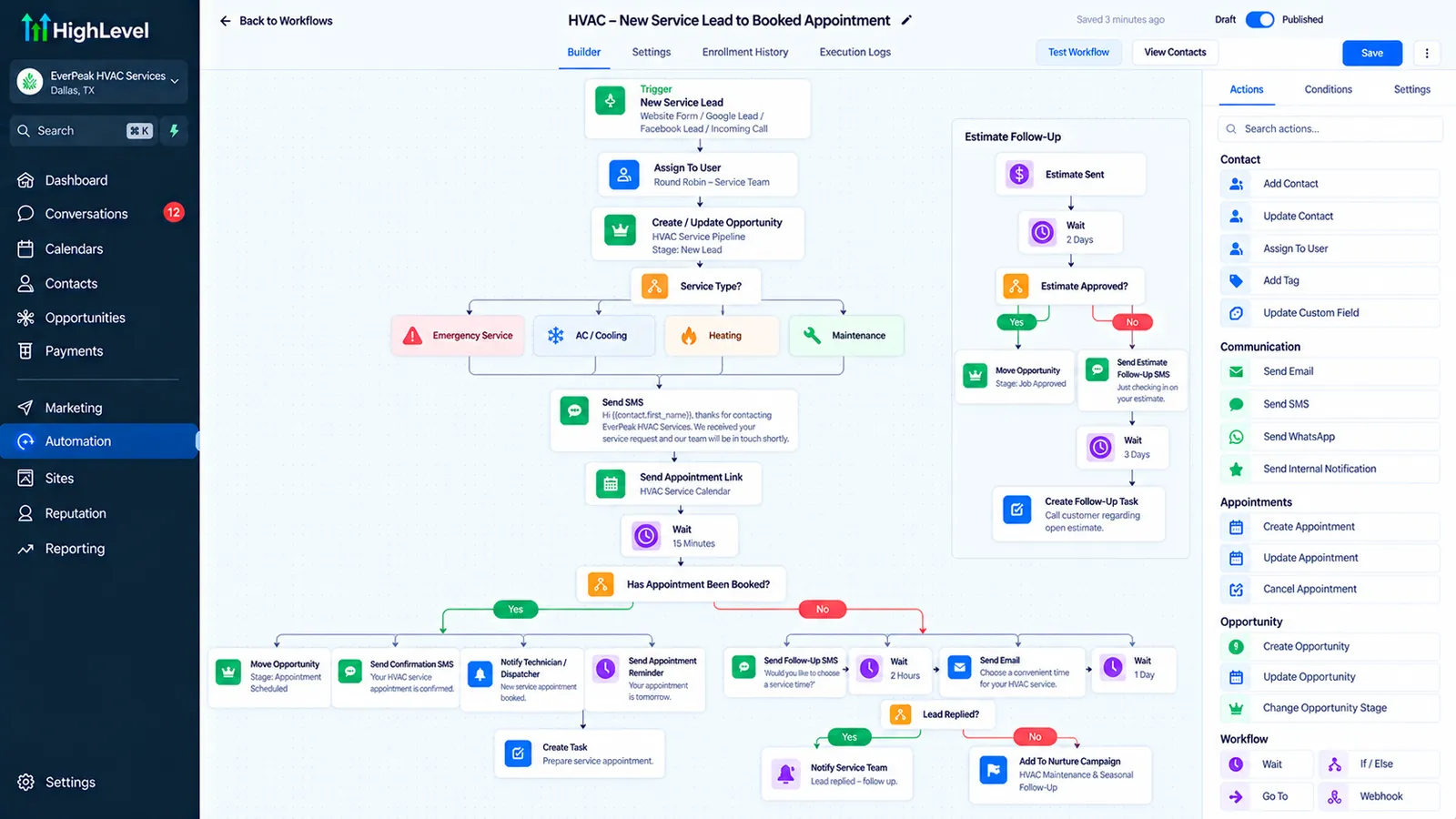
GoHighLevel’s missed-call text-back feature triggers automatically the moment an inbound call goes unanswered, sending a text acknowledging the miss and inviting the caller to describe their issue or request a callback by text instead. For a small HVAC company where the office phone might genuinely be unattended during a busy dispatch morning, this single workflow captures leads that would otherwise be lost, at low ongoing cost once it’s configured: HighLevel charges $0.00747 per US SMS segment plus a carrier fee of $0.0035 to $0.0050 depending on the carrier. Texting from a local number also requires A2P 10DLC registration, and the A2P 10DLC fee calculator adds up the one-time and monthly fees.
Home services has a below-average missed-call rate. CallRail’s January 2025 benchmark report, built from an analysis of 1.1 million leads and conversations across seven industries, puts home services at 14% missed calls, well below healthcare’s 32% and legal’s 28%, and only slightly above real estate’s 9%. That contradicts the “contractors are terrible at answering the phone” line repeated across a lot of HVAC marketing content.
Home services isn’t unusually bad at missing calls, but a missed call costs more per incident than it does in most other industries. A no-heat call in January or a no-cooling call in July is frequently a four-figure repair or replacement job, and the homeowner on the other end isn’t going to wait around. CallRail’s announcement also repeats a widely cited figure that up to 85% of callers whose calls go unanswered never call back. That number comes from a third-party source CallRail links to, not from its own lead analysis, so treat it as directional. A missed call in home services is a real job walking out the door, which is why the text-back workflow matters even at a below-average miss rate.
Several “GoHighLevel for HVAC” articles ranking today cite statistics attributed to sources that don’t hold up when checked, publications and case-study libraries that either don’t exist or don’t say what’s claimed. Every statistic in this guide links to a real, live source you can check yourself.
The text itself should acknowledge the call, ask what’s going on (no heat, no cooling, a strange noise, a scheduled maintenance request), and offer a clear next step, a booking link or a promise of a callback within a specific window. A generic “sorry we missed you” without a next step leaves the urgency problem unsolved.
Automate dispatch and technician-assignment notifications
Once a job is booked, both the customer and the assigned technician need timely, accurate information, and automation relays that information for every job better than a person working through it call by call.
On the customer side, a workflow triggered when a technician is assigned can send a notification with the technician’s name, a photo if your process supports it, and an estimated arrival window. A follow-up “technician is on the way” text, sent a set number of minutes before arrival or triggered by the technician’s own status update, reduces no-one-home situations and the wasted trip that comes with them.
On the technician side, the same trigger can notify the assigned tech with the job address, customer notes, and relevant service history, whether this is a repeat customer, what equipment they have on file, any access instructions like a gate code, pulled from the CRM. Where the company already runs dedicated dispatch or field-service software for routing and scheduling logic, GoHighLevel handles the communication layer around that system. A webhook or integration connecting the two keeps job-status changes flowing into GoHighLevel’s customer-facing notifications without technicians having to send those messages themselves.
Confirm and remind on every scheduled appointment
Scheduled maintenance visits and non-emergency repairs benefit from the same confirmation-and-reminder pattern used across other service businesses, adapted to HVAC’s specific appointment types. A confirmation sent immediately after booking, a reminder a day or two ahead, and a same-day reminder with the arrival window keep a scheduled visit from turning into a missed appointment because the homeowner simply forgot.
Each reminder should reference the specific appointment, service type, date, and arrival window, using merge fields pulled from the calendar record so the same workflow serves a routine tune-up, a repair visit, and an installation appointment without needing three separately hand-built sequences. Building it once with the right merge fields is less setup work than maintaining parallel sequences for every appointment type.
Build a multi-touch follow-up sequence for estimate and replacement jobs
A routine repair call converts to a booked job quickly; a full system replacement or major install estimate usually doesn’t. Homeowners facing a five-figure decision typically compare quotes from more than one contractor and take time weighing financing options, so a single follow-up call after delivering the estimate leaves a lot of that decision window uncovered.
A dedicated estimate follow-up workflow covers this without relying on a technician or salesperson to remember to circle back. A typical sequence spaces two or three touches over one to two weeks after the estimate is delivered, the first checking in on questions, a later one addressing common objections like financing availability or installation scheduling flexibility, and a final touch before the estimate’s stated expiration if one applies. The workflow needs a clear exit condition, the estimate is accepted, or the customer explicitly declines, so it stops the moment the decision is made and doesn’t keep messaging someone who’s already gone with another contractor. Window and door installers run the same kind of quote follow-up, covered in GoHighLevel for window and door installers.
This is also where segmenting estimate value matters. A minor repair quote doesn’t need the same multi-touch cadence as a full system replacement; building the follow-up workflow to trigger only above a defined estimate value, or tagging estimates by job type, keeps the sequence proportional to the size of the decision the customer is actually making.
Financing questions come up often enough on replacement estimates that it’s worth building a dedicated branch for them instead of handling each one as a one-off conversation. A workflow that detects a financing-related reply, whether through a keyword trigger or a simple “yes, tell me about financing” reply option, can route the customer directly to financing information or a calculator link instead of waiting for a salesperson to notice the question in a shared inbox. For a company running several estimates a week, that single branch often resolves the most common reason a promising estimate stalls.
This follow-up work pays off at scale, too. Among contractors earning $10 million or more per year, 47% report that following up on previously unsold estimates generates 11-15% of total revenue, according to ServiceTitan and Thrive Analytics’ 2025 Residential Industry Report, based on a survey of more than 1,000 residential contractors. That is a meaningful share of revenue sitting in estimates that were delivered but not followed up on consistently.
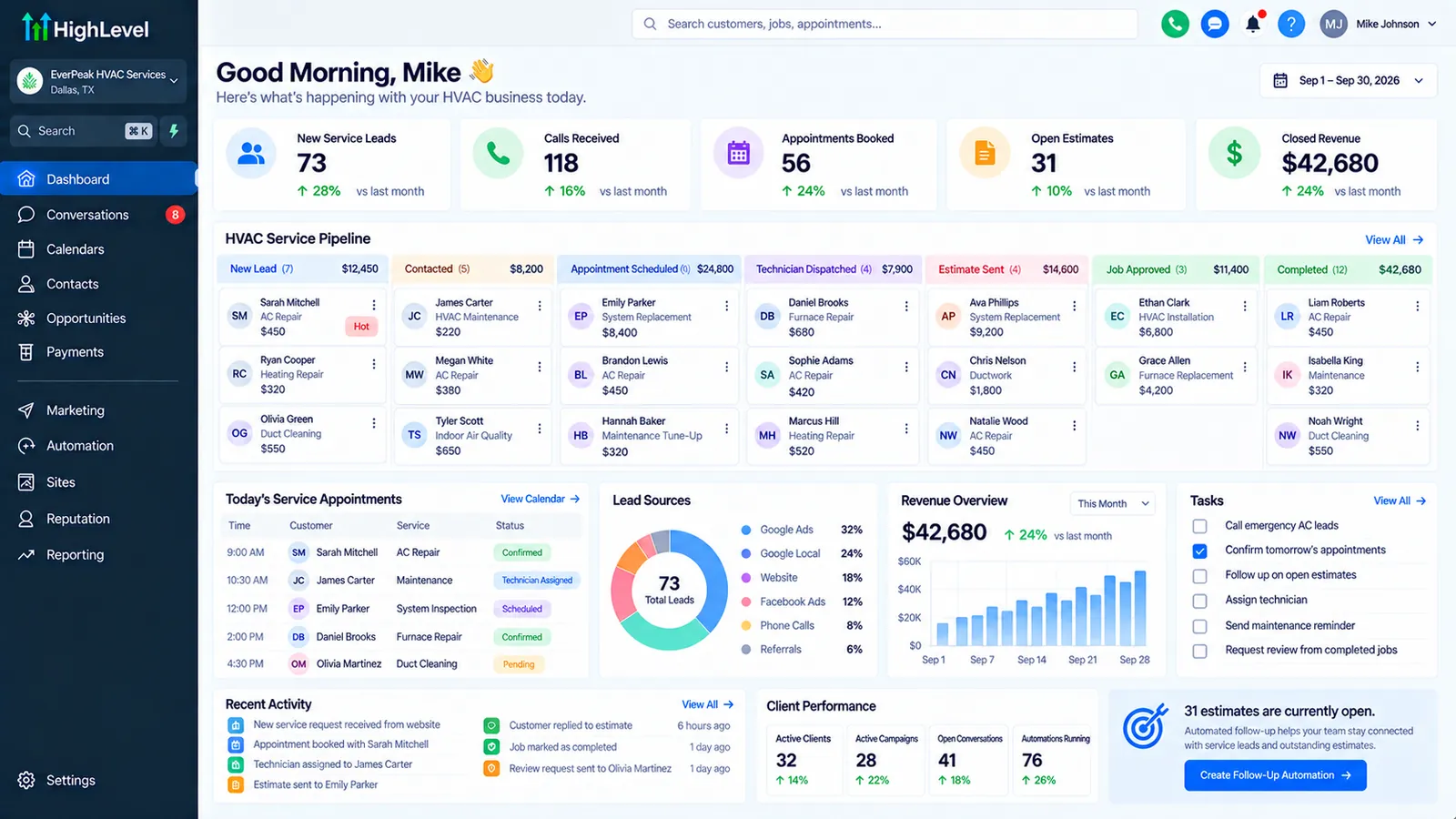 *Illustrative example of a GoHighLevel pipeline view for a fictional HVAC company, built to show how service and estimate stages might be organized. Names and figures shown are invented sample data, not an actual client's account.*
Automate review requests right after the job is done
Timing drives review-request conversion more than the wording of the message does. A request sent shortly after a completed job, while the technician’s visit and the resolved problem are still fresh, gets a meaningfully higher response rate than one sent days later after the memory has faded into “yeah it’s working now” indifference.
A straightforward setup triggers a review-request text or email once a job is marked complete in the CRM or dispatch system, with a direct link to the company’s preferred review platform. This should apply to every completed job, with no filtering to visits the office believes went especially well. Selectively soliciting only likely-satisfied customers can run against several review platforms’ policies on review solicitation, and it also forfeits the chance to catch a dissatisfied customer through a private channel before a public complaint happens.
BrightLocal’s 2026 Local Consumer Review Survey (February 2026, 1,002 US consumers) shows how much asking matters: 78% of consumers were asked to leave a review in the previous 12 months, and 28% say they will “always” write one when asked, up from 16% in 2025. Some HVAC companies add a short quality-check step ahead of the public review ask, a quick “how did today’s visit go” message that routes a negative response to a manager for follow-up while a positive response proceeds to the review request. Applied evenly across every job, this catches service issues early without appearing to cherry-pick only satisfied customers for public reviews.
Reactivate maintenance-plan customers by season, not by calendar blast
Seasonal maintenance plans are a meaningful recurring-revenue stream for HVAC companies, and the reactivation problem is similar to the renewal problem other service businesses face: a single blast sent to the entire customer list on the same date each year reaches people at wildly different points in their actual service need.
A more precise setup ties reactivation to the season itself (heating season approaching, cooling season approaching) and to each customer’s actual service history (a custom field tracking their last tune-up date). A customer whose last AC service was over a year ago heading into summer is a stronger, more specific trigger for a reactivation message than a generic “spring is here” email sent to everyone regardless of when they were last serviced. Most HVAC builds run this as two parallel workflows, one for heating season and one for cooling season, sharing the same underlying trigger logic against the last-service-date field but with season-specific messaging.
Maintenance-plan customers specifically, those on a recurring service agreement, deserve their own renewal-reminder workflow tied to their plan’s actual renewal date. It follows the same pattern as a scheduled visit reminder, keyed to the plan record instead of a single appointment.
How do you handle after-hours emergency calls without staffing a 24/7 office?
A no-heat call at 11pm in January is where automation earns its keep, because most HVAC companies can’t justify staffing a live office overnight, yet an unanswered after-hours call is arguably the highest-urgency miss of any call type described in this guide. The missed-call text-back workflow covered earlier still applies after hours, but it needs a distinct branch: an after-hours message should set different expectations than a daytime one, acknowledging the emergency, confirming whether the company offers emergency service at all, and either routing the reply to an on-call technician’s phone or clearly stating a morning callback window if it doesn’t.
For companies that do offer after-hours emergency service, a workflow can route a qualifying after-hours reply (a keyword like “no heat” or “emergency,” or a form response confirming urgency) directly to an on-call technician via a forwarded text or a task assigned to whoever’s on the on-call rotation that week. Managing the rotation itself is usually simpler as a shared calendar or a custom field updated weekly than as workflow logic, since on-call schedules change often enough that hard-coding a single phone number into a workflow becomes a maintenance burden within a few months. The workflow only routes to whoever the current on-call field names.
Companies that don’t offer true after-hours emergency service still benefit from saying so. A clear “we’re closed until 8am, here’s what to do in a true emergency (gas smell, carbon monoxide alarm), and we’ll be the first call you get in the morning” message manages the homeowner’s expectations and keeps them from assuming they’ve been ignored, which matters for the same-company-callback rate the next morning.
How do you track which marketing channel actually produces jobs?
Missed-call recovery and dispatch automation solve what happens after a lead calls, but HVAC companies spending on Google Ads, local SEO, or home-service marketplaces like Angi or Thumbtack also need to know which channel is actually producing booked, paid jobs as well as inbound calls. GoHighLevel supports call tracking numbers assigned per channel or per campaign, so a call coming in through a Google Ads-specific number gets tagged automatically by source at the point of intake, the same source-tagging pattern used elsewhere in this guide for review and follow-up sequences. If you also record those calls for training or dispute handling, check the consent rules in your state first; our answer on whether it’s legal to record calls in GoHighLevel covers the one-party and two-party split.
The practical payoff shows up in the pipeline reporting: tagging every lead by source at intake means a company can eventually see close rate and average job value by channel as well as call count by channel. A channel that produces a lot of calls but a low close rate or small average job value is a different marketing decision than a channel producing fewer calls but consistently larger, higher-margin jobs, and that distinction is invisible unless source tracking is built into the intake workflow from the start. The alternative is reconstructing it later from memory or a marketing platform’s own (often inflated) attribution numbers.
Common troubleshooting scenarios specific to HVAC builds
A few issues come up often enough in HVAC-specific builds to flag directly. First, missed-call text-back firing on internal and vendor calls as well as customer calls, which happens when the tracking number used for the workflow is also the number staff use for outbound calls to suppliers or subcontractors; routing customer-facing and internal calls through separate numbers avoids the workflow triggering on calls it was never meant to catch. Second, technician notifications arriving with stale job information, usually traced back to a dispatch-system integration that syncs on a delay, worth checking against the dispatch platform’s sync settings before assuming the GoHighLevel workflow itself is broken. Third, seasonal reactivation workflows firing for customers who already booked their tune-up, which happens when the last-service-date custom field isn’t being updated immediately after a completed job closes out. The fix is tying that field update to the same “job marked complete” trigger that fires the review-request workflow, so both fire off one reliable event and can’t drift out of sync the way two separately maintained triggers can.
What an HVAC automation build actually requires
Most of what’s covered here fits inside a standard single-business GoHighLevel setup, adapted to an HVAC company’s specific service types (repair, maintenance, install) and appointment flow. The core pieces are missed-call text-back, the dispatch-notification triggers connecting to whatever field-service system already handles routing, the appointment confirmation and reminder sequences, the estimate follow-up workflow for larger jobs, the review-request workflow, and the seasonal reactivation workflows tied to service-history fields.
GoHighLevel runs alongside the dispatch or field-service software your technicians already rely on for routing and job-costing, as the customer-facing communication layer, connected through an integration or webhook where the two need to share job-status data.
Most residential contractors are doing fine, 63% describe their business as thriving or consistently growing, but nearly one in five call it a struggle, per ServiceTitan and Thrive Analytics’ 2025 Residential Industry Report. The same report found that 64% of surveyed contractors still lean on phone calls as their primary customer communication channel. A business that leans on the phone as its primary channel has a lot riding on what happens the moment that phone isn’t answered.
The bottom line for HVAC companies using GoHighLevel
Timing runs through all of this: missed-call text-back captures emergency leads before they call the next company on the list, dispatch notifications and reminders reduce no-one-home trips and no-shows, a dedicated estimate follow-up sequence gives bigger install and replacement jobs the multi-touch attention they actually need to close, and seasonal reactivation tied to real service history brings maintenance customers back at the moment they actually need service instead of on an arbitrary calendar date. Companies that treat these as the priority builds, ahead of a generic marketing snapshot, tend to see the clearest results. For a company ready to scope this out, the GoHighLevel implementation services page details what a properly structured setup involves.
To have these workflows built and connected to your field-service software, see GoHighLevel setup for HVAC companies.
Sources
- CallRail, benchmark report announcement (Business Wire), January 15, 2025 (1.1 million leads, missed-call rates by industry). Checked October 7, 2026.
- ServiceTitan and Thrive Analytics, 2025 Residential Industry Report, March 25, 2025. Checked October 7, 2026.
- BrightLocal, Local Consumer Review Survey 2026, February 11, 2026. Checked October 7, 2026.
- HighLevel Help Center, A2P 10DLC fees, modified September 24, 2026. Checked October 7, 2026.
- HighLevel Help Center, “How to Calculate SMS and MMS Costs” (US base rate $0.00747 per segment), and the Twilio US SMS pricing page it points to for carrier fees. Checked October 7, 2026.