
 By Alpit Patel and the aibrevo team · September 17, 2026 · 16 min read
GoHighLevel's Funnel Builder vs ClickFunnels
GoHighLevel's funnel builder compared to ClickFunnels on the things that decide a page-building purchase: drag-and-drop editing, template depth, split testing, and load speed, not overall platform breadth.
Key takeaways
- Both editors are true drag-and-drop, section-based builders — the real difference is what's wired to the page after you publish it, not how you place elements on it.
- ClickFunnels ships a deeper, more curated template library built specifically for offer funnels; GoHighLevel's library is broader across industries but leans more generic in a straight side-by-side.
- Both platforms include native split testing on every plan, GoHighLevel and ClickFunnels each cap most flows at two live variants per test, so neither wins on testing depth alone.
- Page load speed is not primarily an editor problem on either platform — image weight, third-party embeds and funnel step count matter more than which builder generated the page.
- GoHighLevel's builder earns its keep once a page needs to talk to a CRM pipeline, SMS follow-up or a calendar the same day it goes live — that's a workflow advantage, not an editor advantage.
- If funnels and a course are the entire business, the case for ClickFunnels' purpose-built editor still holds; the fuller platform trade-off is covered separately in aibrevo's GoHighLevel vs ClickFunnels comparison.
GoHighLevel’s funnel builder is a native drag-and-drop editor for funnels, landing pages and full websites, included on every plan starting at $97/month, with 100+ templates, built-in split testing and an AI layout generator. It builds pages as well as most dedicated funnel tools on the individual editing experience, and it pulls ahead the moment a page needs to hand a lead to a CRM pipeline, SMS sequence or calendar the same day it goes live.
That’s a narrower question than “GoHighLevel vs ClickFunnels” as a platform. aibrevo’s full GoHighLevel vs ClickFunnels comparison already covers pricing tiers, CRM depth, white-label reselling and the broader question of which platform to run your business on. This post stays inside the editor: what it’s like to actually build a page, how the template libraries compare, what split testing looks like in practice, and what determines whether a funnel loads fast — because those four things get lost in most head-to-head platform reviews, and they’re the ones that actually decide whether a funnel converts.
Most searches for “gohighlevel funnel builder” land on either a generic feature list copied from GoHighLevel’s own marketing pages or a broad platform comparison that spends a paragraph on the editor before moving on to pricing tiers and CRM features. Neither answers the question someone building an actual funnel this week is asking: can I drag a section into place the way I’m used to, does the template library have something close to my offer already, and will split testing tell me anything useful without a separate tool bolted on. That’s the gap this post is trying to close — editor mechanics and page-building specifics, sourced from vendor documentation and independent reviews rather than restating either company’s own sales copy.
What does GoHighLevel’s funnel builder actually do?
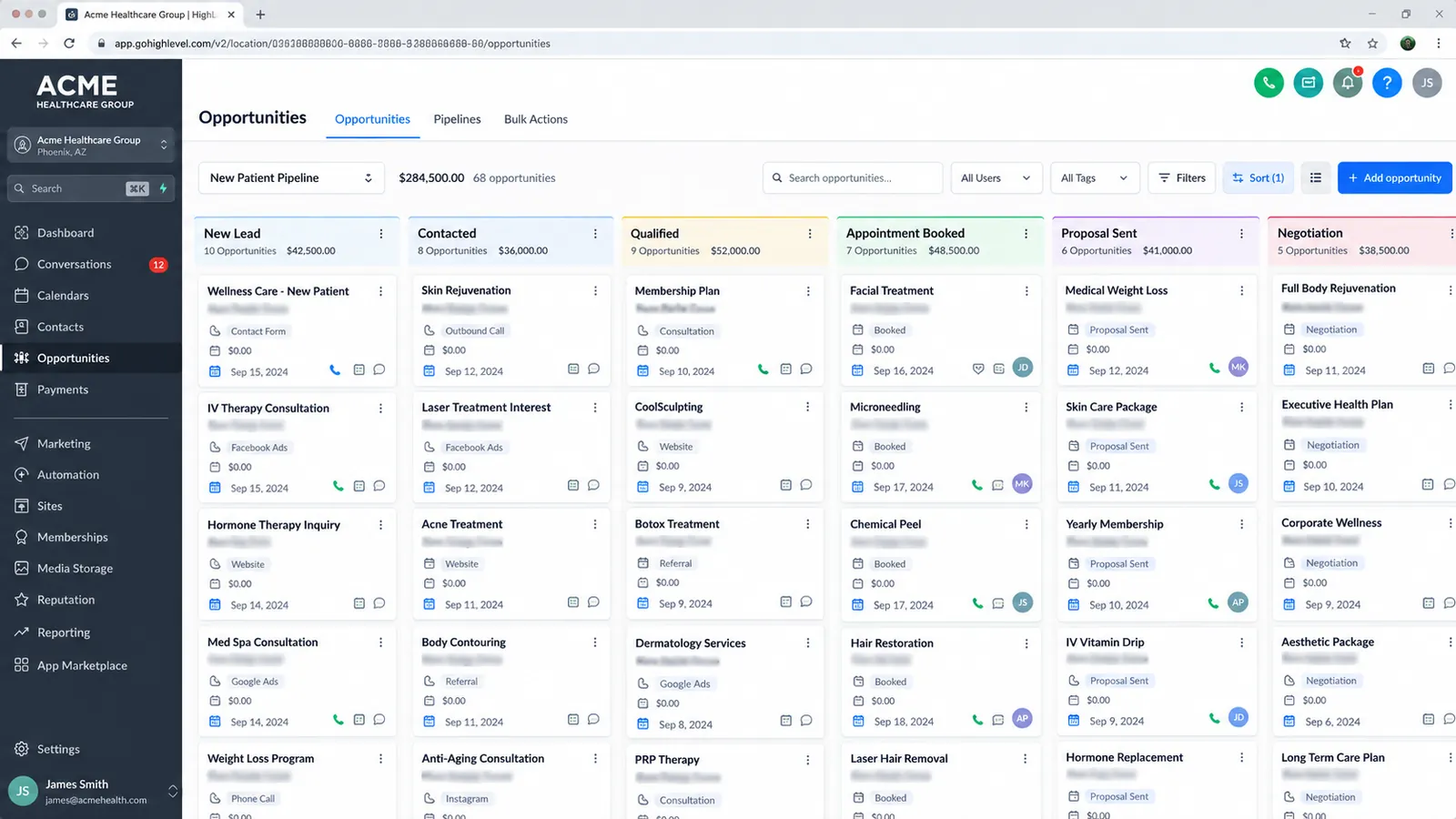
GoHighLevel’s funnel builder is a section-based, drag-and-drop page editor built into the core platform — not a bolt-on module or a separate product. You build a funnel as a sequence of connected pages (opt-in, sales page, order form, upsell, thank-you) inside one project, and each page is a canvas of rows, columns and elements you drag into place: headlines, image blocks, video embeds, countdown timers, forms, order bumps, and custom HTML/CSS blocks for anything the built-in elements don’t cover.
The part that’s easy to undersell in a features list is what happens after you place an element. A form block on a GoHighLevel page isn’t just collecting an email address into a spreadsheet — it’s writing directly into the same contact record the CRM pipeline, SMS automations and calendar booking flow all read from. According to GoHighLevel’s own funnel guide, every page, form submission and button click in the funnel builder is connected natively to the CRM, automation workflows, and payment processing without a separate integration step. That native wiring is the actual product being sold here — the editor is table stakes.
GoHighLevel added Funnel & Website AI as a 2026-era feature: describe a business and offer in a prompt, or point it at a URL or set of guided inputs, and it drafts a full funnel — layout, copy, structure — that then opens in the standard editor for manual refinement, per HighLevel’s support documentation. It’s a starting-point generator, not a replacement for editing — every AI-drafted page still needs a human pass on copy and offer specifics before it’s ready to run traffic.
What’s it actually like to build a funnel in the editor?
Opening the builder for the first time, you pick a funnel type — lead generation, sales, webinar, membership — or start from a blank canvas, and GoHighLevel scaffolds the step sequence (a lead-gen funnel gets an opt-in page and a thank-you page by default; a sales funnel adds an order form and upsell steps). Each step opens into the same canvas editor: rows stack vertically, columns split a row into side-by-side sections, and elements — headline, paragraph, image, video, button, form, countdown timer, FAQ accordion, testimonial block — drop into any column. Styling happens at three levels: global (fonts and brand colors set once for the whole funnel), section (background color, padding, a full-bleed image), and element (an individual button’s color or a single headline’s size), which keeps a 20-page funnel visually consistent without re-styling every page by hand.
The form element is where the editor’s CRM wiring actually shows up during building, not just after publish. Adding a form to a page opens a pop-up form builder inside the funnel editor itself — you pick which fields to collect, and each field maps to a custom field or standard field on the contact record in the CRM, live, while you’re still editing the page. That’s a meaningfully different workflow from a standalone funnel tool, where a form typically posts to an email list or a webhook and the CRM mapping happens as a separate integration step afterward. Publishing a page is instant — there’s no separate “deploy” step or build queue — and every published page gets both a GoHighLevel-hosted URL and the option to connect a custom domain, with SSL handled automatically on custom domains through the platform’s built-in certificate provisioning.
Mobile responsiveness is handled per-breakpoint rather than purely automatic: the editor gives a desktop view and a mobile view as separate tabs, and while most section and element settings carry over automatically, spacing, font size and column stacking order can be adjusted independently for mobile — which matters because a three-column desktop layout that looks fine at full width often needs manual reordering to read well stacked on a phone screen, and skipping that mobile pass is one of the more common reasons a GoHighLevel funnel converts worse on mobile traffic than desktop traffic even though the underlying page technically “works” on both.
How does it compare to ClickFunnels’ editor specifically?
ClickFunnels’ editor is what the company was originally built around, and it still shows — the drag-and-drop interface is widely described as intuitive for non-technical marketers, and the platform’s templates are purpose-built for classic direct-response funnel structures: opt-in to sales page to order form to one-click upsell to thank-you page, mapped closely to how ClickFunnels’ own founders originally taught funnel-building.
On raw element-placement mechanics, the two editors aren’t far apart in 2026 — both are section-and-row canvas builders, both support custom code blocks, both produce mobile-responsive output by default. Where they diverge is checkout mechanics and what the page connects to on save. ClickFunnels’ one-click upsell and order-bump flow is a long-standing, mature feature set built specifically for that direct-response checkout pattern — stacking offers at the point of purchase without forcing a second checkout entry. GoHighLevel supports order forms and upsell pages too, but the feature is less specialized for that exact mechanic; it’s one editor covering many use cases rather than one editor built around a single conversion pattern.
There’s a real, well-documented learning-curve gap worth naming honestly: GoHighLevel’s much larger surface area (CRM, automations, sub-accounts, the funnel builder among them) means new users report a steeper ramp than ClickFunnels’ narrower, funnel-first interface. GoHighLevel scores an 8.2/10 ease-of-use rating in one 2026 review roundup and 3.7/5 on Software Advice specifically, a lower number attributed to the platform’s breadth rather than the editor itself, according to HighLevel.ai’s review analysis. If you’re a solo creator who only ever touches the funnel builder and nothing else in either platform, ClickFunnels’ focused interface is genuinely the gentler onboarding.
Template library: how deep is each one?
GoHighLevel ships 100+ free funnel and website templates, organized by industry — real estate, fitness, automotive, financial services, coaching, agency, ecommerce and more — all editable in the drag-and-drop builder and mobile-responsive by default, per ThisGHLGuy’s 2026 GoHighLevel funnel builder breakdown. Every template is included on every plan, including the $97/month Starter tier — there’s no premium template tier gating better designs behind a higher price point.
ClickFunnels’ library is smaller in raw count but more tightly curated around proven direct-response structures. Independent reviews describe ClickFunnels templates as converting 15–25% higher out of the box compared to generic landing-page-builder templates in testing, according to one 2026 ClickFunnels review roundup — though that figure comes from a third-party review site rather than a controlled, independently audited study, so treat it as a directional claim rather than a hard benchmark you can bank on for your own funnel. What the number does capture directionally: ClickFunnels’ templates are built by people optimizing specifically for offer conversion, where GoHighLevel’s wider industry spread trades some of that conversion-specific polish for breadth across use cases the platform’s broader customer base actually needs — an agency landing page has different conversion mechanics than a webinar registration funnel, and GoHighLevel’s library tries to cover both rather than specializing in one.
For agencies specifically, GoHighLevel has a structural advantage neither template count nor conversion polish captures: a funnel built once can be packaged into a Snapshot and cloned into a new client sub-account with the CRM, automations and pipeline already wired in — a workflow no standalone funnel tool replicates without manual rebuilding for each client, per GoHighLevel’s own funnel builder overview.
Split testing: what can you actually test, and how?
Both platforms build split testing into the core product rather than gating it behind a premium tier, and the mechanics are close to identical. In GoHighLevel, you duplicate a funnel step as a variant, set a traffic-split percentage, and the platform automatically routes visitors and tracks conversion statistics per variant, according to Humblytics’ 2026 GoHighLevel split-testing guide and HighLevel’s own support documentation. Marketers commonly test headlines, hero images, button color and full layout variants, and GoHighLevel extends the same split-test logic to email subject lines for open-rate testing.
ClickFunnels’ split testing works the same way in practice — duplicate a page as Variant B, make one change, set the traffic split, run it — and it’s built into every funnel rather than a paid add-on. The one shared limitation worth flagging plainly: both platforms cap most split-test flows at two live variants per test. Neither one supports true multivariate testing (three-plus simultaneous variants with statistical interaction analysis) natively — if that’s a hard requirement, you’re looking at a dedicated testing tool like Optimizely or VWO layered on top of either platform, not a native GoHighLevel or ClickFunnels feature.
Does page load speed actually differ between the two?
This is the question with the least reliable public data, and it’s worth being direct about that rather than picking a side to sound decisive. Neither GoHighLevel nor ClickFunnels publishes independently audited Core Web Vitals benchmarks comparing their platforms head-to-head, and third-party review claims on this point are inconsistent — one review states ClickFunnels’ newer funnel platform “was built to deliver high speed and the best user experience in the industry,” while another from the same review cycle notes that load speed “can be slow sometimes” and that a self-hosted WordPress site with a dedicated page builder can outperform ClickFunnels’ own blog on site speed. Those two claims sit in tension with each other, which is itself the honest finding: speed claims for both platforms are anecdotal rather than benchmarked.
What’s more reliably true, and matters more in practice: page load speed on either platform is driven far more by what you put on the page than by which builder generated it. Image weight, embedded video, third-party tracking pixels stacked three or four deep, and the number of funnel steps a visitor has to load in sequence all move the needle more than the underlying editor’s code output. If speed is a genuine concern for a specific funnel, the reliable path is testing that exact page with Google PageSpeed Insights or GTmetrix after publishing — not trusting either vendor’s general performance claims, and not trusting a competitor review’s general claims about the other vendor either.
What does funnel-builder access actually cost on each platform?
Neither platform sells the funnel builder as a separate line item — it’s bundled into the base subscription on both sides, which makes a direct plan-to-plan price comparison more honest than comparing a bare “funnel tool” price. GoHighLevel’s Starter plan runs $97/month flat and includes the full drag-and-drop builder, unlimited funnels, all templates, and split testing, with no page-count or contact-count cap on the builder itself (usage-based costs on GoHighLevel come from SMS, email sending and phone minutes, not from the funnel builder). ClickFunnels’ base tier also starts at $97/month and includes its editor, templates and split testing, but — unlike GoHighLevel’s flat structure — ClickFunnels’ higher tiers gate contact and email-send volume by workspace, with a top tier priced near $5,997/year for teams that need higher caps and more collaborator seats, per the comparison table in aibrevo’s GoHighLevel vs ClickFunnels guide.
The practical implication for a funnel-only buyer: at the entry tier, the sticker price is identical, so the decision genuinely comes down to which editor and template style fits the offer, not which one is cheaper. Where the price gap opens up is scale — an agency running funnels for ten clients pays for ten GoHighLevel sub-accounts (or one agency account with ten client sub-accounts under it) built around a CRM structure ClickFunnels doesn’t have an equivalent for, while a ClickFunnels agency workaround typically means separate workspaces without the same client-isolation model. That’s a platform-breadth question more than a funnel-builder question, and it’s covered in more depth in the full comparison rather than repeated here.
What are the common mistakes people make evaluating either builder?
A few patterns show up often enough in agency and consultant conversations to name directly. The first is judging a funnel builder purely on the demo template rather than on how it performs once real brand assets and real copy replace the placeholder content — a template that looks sharp with stock photography and lorem ipsum can look noticeably different once it’s carrying an actual logo, a longer headline, and a five-paragraph offer description, and that gap shows up on both platforms equally. The second is assuming split-test “winners” from underpowered traffic are real — running a two-variant test for three days on a funnel getting forty visitors a day and declaring a winner is a statistics mistake independent of which platform ran the test; both GoHighLevel’s and ClickFunnels’ native split-testing tools will happily report a “winner” on a sample size too small to trust, and neither platform’s default reporting stops you from acting on it prematurely.
The third mistake is specific to switching platforms: underestimating the rebuild cost of moving an existing funnel. Because there’s no native ClickFunnels-to-GoHighLevel import tool, “switching platforms” in practice means every page gets rebuilt by hand or reconstructed from a similar GoHighLevel template — copy can usually be pasted over quickly, but layout, styling and any custom code blocks need to be redone from scratch. Budgeting that rebuild time (or a partner’s time) into a platform-switch decision matters as much as comparing the two editors’ feature lists, and it’s a cost that’s easy to leave out of a decision made purely by comparing marketing pages.
Which one should you actually use?
If the entire business is funnels and a course — no SMS follow-up, no calendar booking, no multi-client sub-accounts — ClickFunnels’ narrower, purpose-built editor and its more curated template library are a legitimate reason to pick it over GoHighLevel. That’s not a consolation prize; it’s the right call for that specific business shape, and pretending otherwise to make a platform look universally better would be dishonest.
Once the page needs to do more than collect a lead — text the lead within a minute of opt-in, book them onto a calendar the same session, or drop them into a pipeline stage a sales rep works the next morning — GoHighLevel’s editor stops competing on template polish and starts winning on what happens after publish. That’s the actual argument for GoHighLevel’s funnel builder, and it’s a workflow argument, not a “better drag-and-drop editor” argument. For agencies running this setup for clients, that same native wiring is what makes GoHighLevel’s implementation worth scoping properly rather than treating funnel setup as a standalone project — the CRM, SMS and calendar layer around the funnel is where most of the actual client value gets built, and getting the GoHighLevel implementation cost estimate right up front avoids the common mistake of pricing a funnel build like it’s a static ClickFunnels-style project.
Agencies that specialize specifically in this setup work exist for a reason — funnel-plus-CRM builds have more moving parts than a template pick and a publish button. Shops like Autoesta’s GoHighLevel setup service and HighLevel Automation Team’s GoHighLevel agency build exactly this connected funnel-and-automation layer for clients who’d rather not learn the platform’s full surface area themselves. If you’re switching from ClickFunnels, know upfront there’s no native one-click funnel importer between the two platforms as of 2026 — moving means rebuilding pages in GoHighLevel’s editor, using a GoHighLevel template as the starting structure, or having whoever handles the migration rebuild it for you.
For the fuller picture — pricing tiers, CRM depth, white-label reselling, and the “choose this if” breakdown for each platform as a whole business tool rather than just an editor — see aibrevo’s GoHighLevel vs ClickFunnels comparison. And if the funnel decision is really a symptom of a bigger CRM-selection question, the how to choose a CRM guide covers how to narrow that field before comparing platforms feature by feature.
Sources
- GoHighLevel: Top 10 funnel builders for lead generation
- HighLevel Support: Funnel & Website AI
- HighLevel Support: Workflow Action - Split
- ThisGHLGuy: GoHighLevel Funnel Builder Complete Guide 2026
- Humblytics: How to Run Split Tests in GoHighLevel
- HighLevel.ai: GoHighLevel Reviews 2026 (G2, Capterra, Trustpilot Analyzed)
- ClickFunnels
- Google PageSpeed Insights