
 By Alpit Patel and the aibrevo team · September 14, 2026 · Updated October 31, 2026 · 14 min read
How to Set Up Pipedrive: A Complete Setup Guide
A step-by-step Pipedrive setup guide: pipeline design, required fields, automation, integrations, migration, reporting, and a realistic week-by-week timeline.
Part of the guide: Pipedrive guide
Key takeaways
- A working Pipedrive setup usually has 4-6 pipeline stages built around your real sales motion, not a generic template; enterprise-style 10-stage pipelines cause reps to stop updating deals.
- Required fields and formats need to be configured before data is imported, since fixing bad data after reps start relying on reports is far more disruptive than setting rules up front.
- Rotting-deal rules are the single most commonly skipped setting, and their absence lets deals sit dead in a pipeline for months while forecasts still look healthy.
- A typical Pipedrive implementation through a partner runs 2-6 weeks and costs roughly $1.5k to $16k depending mostly on migration complexity, not customization depth.
- LeadBooster and Campaigns are separate paid add-ons, not features bundled into Pipedrive's core plans; deciding whether you need them belongs in week one, not mid-project.
- Migration should include mapping and de-duplication before import; a straight import of an old spreadsheet or CRM just carries the same data-quality problems into a nicer interface.
Setting up Pipedrive properly means designing a pipeline that matches your actual sales motion, deciding which fields are required and when, building a small number of automations that save reps real time, connecting the tools reps already use, migrating existing data with cleanup instead of a straight import, and only then building reports. Skip the design decisions and jump straight to import, and you end up with a nicer-looking version of the same messy spreadsheet you started with. This guide walks through each step in the order that actually works, along with the mistakes that show up most often and a realistic timeline.
If you’re still weighing Pipedrive against the process you’re running today, Pipedrive vs a Spreadsheet covers that comparison directly. This guide assumes Pipedrive is the confirmed destination and focuses on doing the setup right the first time.
Design your pipeline stages around your real sales motion
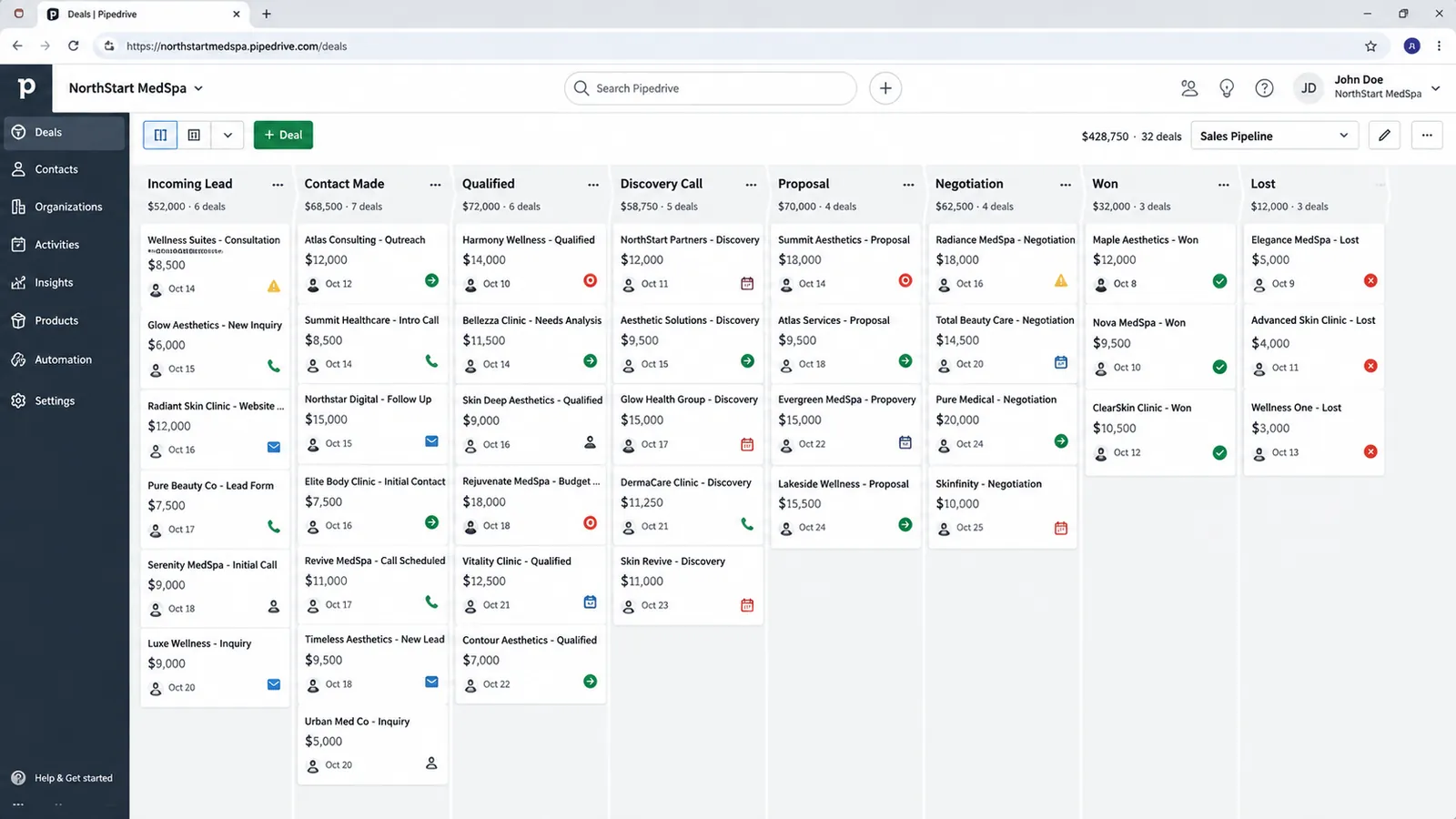
Pipeline design is the first decision, and it’s the one that determines whether reps actually use the tool six months from now. The instinct is to reach for a generic template, or worse, to copy an enterprise-style pipeline with ten or more stages because it looks thorough. Most sales teams need 4-6 stages: enough that a rep can look at the board and immediately understand where a deal stands and what needs to happen next, but few enough that moving a deal forward doesn’t feel like administrative overhead.
Build the stage list from how deals actually move today, not from how the sales process is documented on paper. Pull a sample of 15-20 recently closed-won deals and trace which stages they passed through. Stages that no deal ever occupies are candidates to cut. Stages that deals visibly skip, jumping from an early conversation straight to a signed contract, suggest your real process has already diverged from what’s written down, and setup is the moment to reconcile the two.
If your business runs more than one different sales motion, new business versus renewals, or a short-cycle product line alongside a longer-cycle service, Pipedrive supports multiple pipelines, and using that deliberately is usually better than cramming every motion into one pipeline with stages that mean different things depending on who’s looking at the board. Assign probability percentages to each stage too, since that’s what makes weighted forecasting in reports usable.
Set required fields and data-quality rules before data lands
Required fields and format rules only do their job if they’re configured before data is imported, not after. Importing everything first and adding validation rules afterward means retroactively fixing a database that’s already inconsistent, which is a much slower process than getting the rules right at the start.
Tie required fields to the point a deal is actually created or moves stage, rather than applying them blanket-wide. Requiring a lead source at deal creation makes sense because it feeds reporting later; requiring ten fields on every deal regardless of context just trains reps to enter a placeholder value to get past the form. Decide field-by-field which ones feed a report or an automation trigger downstream, since those are the fields where a malformed entry breaks something rather than just looking untidy.
This is also the point to decide field formats, currency and deal-value conventions, and how custom fields will be used, since custom fields tend to accumulate unchecked once a team starts adding “just one more” field per request. A field audit six months in almost always turns up several fields nobody has looked at since they were created.
Build a small number of automations, not everything possible
Workflow Automation is where a lot of Pipedrive setups either save the team real time or generate noise that gets ignored within a month. Automate the handful of triggers that remove manual work reps were doing anyway: task creation on stage change, a notification when a high-value deal moves, a follow-up reminder after a set number of days with no activity.
Rotting-deal rules deserve specific attention because they’re the most commonly skipped setting, and skipping them is one of the most damaging gaps in a Pipedrive setup. A rotting-deal rule flags any deal that’s sat in the same stage past a threshold you set, surfacing it visually on the board or via notification. Without that rule turned on, deals can sit untouched for months while the pipeline still looks full and healthy in a report. Turn them on at setup instead of after someone notices the forecast looks wrong; it’s one of the cheapest fixes available for the problem it prevents.
For a deeper breakdown of which specific automations are worth building first and which ones tend to create more noise than value, see Pipedrive Automation: What to Automate First.
Connect the tools your reps already use
Integration setup covers email, calendar, lead sources, and anything else in the stack reps touch daily. Native two-way email and calendar sync means activity gets logged automatically instead of relying on a rep to remember to note a call happened, which matters directly for the reporting step later. Native integrations cover most common lead-source and marketing tools; anything more specific can usually go through the Pipedrive API without custom development. Email is usually first; the Pipedrive email sync setup guide covers Gmail and Outlook, Smart BCC and privacy settings. If you would rather hire help, see how to choose a Pipedrive consultant.
This is also the stage to make an explicit decision about LeadBooster and Campaigns rather than assuming either is already included. Both are separate paid add-ons on top of Pipedrive’s core plans: LeadBooster covers chatbot, live chat, web forms and a prospecting tool, and Campaigns covers email marketing. Teams that skip this scoping conversation upfront often discover the gap mid-setup, when someone goes looking for a feature that turns out to require an additional line item. Deciding in week one whether either add-on is part of the plan avoids a budget surprise later, and it’s a conversation worth having alongside a look at the overall implementation cost so the full picture, add-ons included, is priced before work starts.
For teams selling more than one product, this is also where the Products feature gets configured, attaching a real product catalog and pricing to deals so pipeline value reflects an actual product mix instead of one manually-typed number per deal. Teams that sell both products and services often combine the Products catalog for standardized SKUs with custom fields, or a separate pipeline, for services work that doesn’t fit a fixed price list.
Migrate existing data with mapping and de-duplication, not a straight import
Migration is where the biggest quality risk in a Pipedrive setup lives, and it’s the step most likely to get rushed because it feels like the least interesting part of the project. Treating migration as a straight import, dumping an old spreadsheet or CRM export directly into Pipedrive, carries forward every stale deal and duplicate contact the old system had, just in a cleaner-looking interface.
Do the cleanup before import. Map every field from the source system to its Pipedrive equivalent explicitly, including deciding what happens to fields that don’t have a direct match. De-duplicate contacts and companies before the data moves, particularly if you’re consolidating more than one source, a CRM export plus a sales spreadsheet plus a list someone kept in a separate tool. Match on email and normalized company name before import, since duplicate-detection tools in most CRMs are built to catch a new duplicate a rep accidentally creates going forward, not to untangle a messy multi-source consolidation after the fact.
Decide how much historical data to bring over as active records versus reference-only. Most teams migrate open deals in full and import closed-won and closed-lost history as read-only records for reporting continuity, rather than as fully active records competing for attention on a live board. That keeps the new pipeline clean without losing the historical data leadership still wants to reference.
Build reporting once activity logging is actually consistent
Reporting is deliberately the last step because a report is only as trustworthy as the activity data feeding it. Build pipeline, conversion and activity reports once logging habits are established across the whole team. At launch, some reps are still getting used to the tool.
The most common reporting failure in a new Pipedrive setup is inconsistent input. When some reps log every call and email and others log nothing, activity-based reports end up comparing behavior rather than results, and the numbers stop meaning what leadership assumes they mean. This is usually a manager-level habit issue, so confirm logging consistency with a few weeks of real usage before building the dashboards leadership will start making decisions from. Our illustrative Pipedrive outbound activity case study shows what fixing that habit looks like on an outbound team.
Once logging is consistent, weighted pipeline value (using the stage probabilities set during pipeline design), conversion rate by stage, and average time-in-stage are the reports most teams find useful day to day, more useful than a large dashboard with every metric the platform can generate.
A realistic week-by-week Pipedrive setup timeline
A typical Pipedrive implementation through a partner runs 2-6 weeks, and the timeline tracks migration complexity and pipeline count more than raw deal volume.
A typical 6-week Pipedrive implementation broken into its four phases. This is a proportional, illustrative timeline, not a fixed schedule: a simple single-pipeline project can compress the whole sequence to 2-3 weeks, while heavy migration cleanup stretches the middle phases longer.
Week 1: Discovery and pipeline design. Stages, probabilities and rotting-deal rules get mapped against the real sales motion rather than a generic template, and the team makes an explicit decision on whether LeadBooster or Campaigns are actually in scope.
Weeks 2-3: Automation build, field configuration, and migration. Workflow Automation gets built, required fields and formats get configured, and data migration from a spreadsheet or legacy CRM happens with mapping and de-duplication done before import, not after.
Weeks 4-5: Integration and reporting. Email, calendar and lead-source tools get connected, and report and dashboard build happens once activity-logging habits are confirmed across the team.
Week 6: Training, parallel run, and go-live. The team gets trained on the new setup, runs a short parallel period alongside the old system, and then goes live. Simple single-pipeline projects for a small team often compress to 2-3 weeks total; a complex migration with heavy de-duplication needs can extend the full project toward 6 weeks.
Cost tracks the same complexity drivers as timeline. Industry ranges for a partner-led setup run roughly $1.5k for a basic single-pipeline configuration to $16k for a complex migration with multiple pipelines and heavy data cleanup (the small-build band is a median of published agency and partner price pages, checked October 2026; the mid-size and complex-migration figures are earlier estimates, not re-verified in USD). That’s implementation cost, separate from the Pipedrive license itself, which runs Essential at roughly $14/user/month up through Enterprise at roughly $99/user/month on annual billing:
See the Pipedrive implementation cost guide for a fuller breakdown of what moves a project toward either end of that range, and aibrevo’s pricing page for how project scope translates into a quote.
Setups that struggle six months in usually have a pipeline that was built to look thorough on day one, with a stage list nobody revisited once real usage showed which stages were fiction.
Set up user roles and permissions before adding the whole team
Permission structure is easy to skip during setup because Pipedrive works with everyone on default access, at least early on. Decide, before rolling the CRM out to the full team, what each role actually needs to see and edit: most reps need visibility into their own deals and their immediate team’s, not the full company pipeline, and most reps don’t need the ability to edit automation rules, required-field settings, or another rep’s closed-won records.
Over-permissioning at setup is the common shortcut: give everyone admin or near-admin access to avoid configuring individual permission sets, and it works fine at five users. It becomes a real data-integrity risk once a team grows past a handful of people and nobody remembers who technically has edit access to what, which shows up eventually as an accidental bulk edit, a deal reassigned by mistake, or a required field disabled by someone who didn’t realize the setting was company-wide rather than personal. Setting role-based visibility and edit rights deliberately at setup, even for a small team, costs little upfront and avoids that class of problem as the team scales.
Managers and sales leadership are the other side of this decision: they typically need cross-team visibility and reporting access that individual reps don’t, and getting that distinction right at setup means a manager can actually see what the reporting step later in this guide is meant to show them, without either restricting them unnecessarily or handing every rep the same broad access by default.
Mobile access and field-rep workflows
Reps who spend meaningful time away from a desk, in a car between meetings or on-site with a client, rely on Pipedrive’s mobile app for the workflows that need to happen in the moment: checking a deal before a meeting, logging a call immediately after it happens, updating a stage on the spot rather than waiting to get back to a laptop. The mobile app covers these core actions well, but it’s not a full parity substitute for desktop: building Workflow Automation rules, configuring custom fields, and setting up required-field logic are desktop-only tasks, which means the setup work covered earlier in this guide needs to happen on desktop before field reps start relying on mobile for daily use.
This has a practical setup-order implication: get pipeline design, required fields, and automation configured and tested on desktop first, then onboard field-heavy reps onto the mobile app once those foundations are in place, rather than trying to configure and train on both simultaneously. A rep logging activity from the mobile app against a pipeline that’s still being restructured on desktop just creates confusion about which version of the setup is actually current.
Common mistakes that undo a Pipedrive setup
A handful of mistakes account for most of the Pipedrive setups that stop working within a few months of launch.
Too many pipeline stages. Teams copy an enterprise-style 10-stage pipeline onto a simple sales motion, and reps stop updating deals because moving them forward feels like unnecessary admin. Fewer, clearer stages get used consistently; more, precise-sounding ones get ignored.
No rotting-deal rules turned on. Deals sit untouched in a stage for months with nothing flagging it, so the pipeline looks healthy in a report while a meaningful share of the deals in it are actually dead. Rotting-deal rules exist specifically to surface this before it distorts forecasting.
Activities logged inconsistently across reps. Some reps log every call and email while others log nothing, so activity-based forecasting and performance reports end up comparing behavior rather than results. This usually needs a manager-level habit fix.
Skipping the LeadBooster or Campaigns scoping decision upfront. Teams assume lead capture or email marketing is bundled into the core plan, only to discover both are separate paid add-ons partway through setup. Deciding upfront whether you’ll actually use them avoids a mid-project budget surprise.
Treating migration as a straight import with no cleanup. Old, stale or duplicate deals get imported as-is because it’s faster than cleaning first, and the new pipeline inherits the same trust problem the old spreadsheet had, just in a nicer interface.
When a Pipedrive setup needs a rebuild instead of a fix
Pipedrive is simple enough by design that most problems that show up after launch are fixable without starting over. Knowing which category a given problem falls into saves time and avoids rebuilding something that only needed a small correction. Sometimes the answer is a different platform; our Pipedrive to HubSpot migration guide covers the most common move.
A single automation firing at the wrong stage or condition is a quick, isolated fix, not evidence the whole setup is broken. A handful of deals missing required data is a reminder or required-field fix, addressable without restructuring anything. A single wrong number in an otherwise-trusted report is usually a filter or field-mapping issue.
On the other side, a pipeline with ten or more stages that nobody on the team agrees on usually needs a redesign, collapsing back to the 4-6 stages that actually reflect the sales motion, rather than tweaking individual stage names. Activity logging that’s wildly inconsistent across the entire team, beyond one or two reps, points to a structural problem, required activity types and manager enforcement, rather than a one-off correction. And an old account set up years ago with no rotting-deal rules and no products structure for a multi-SKU business usually needs a fuller reconfiguration rather than piecemeal patches. If you’re evaluating an existing setup against these signals, Pipedrive implementation services covers what an audit-first engagement looks like before any rebuild work starts.